How to Watch Peacock TV in Australia [2025 Guide]

Watch Peacock TV in Australia

Wondering how to watch Peacock TV in Australia? While Peacock is only available in the US, you can access it using a VPN in Australia. 

By connecting to a U.S. server, you can unlock its vast library of shows, movies, and live sports on your device, bringing the full Peacock experience to Australia.

In this article, I will show you how Australians can stream Peacock TV – or anywhere else in the world, too – sit tight and don’t blink, let the Kangaroo fight the Peacock!

Is Peacock TV Available in Australia 2025?

No, Peacock TV is entirely geo-locked and exclusively available in the United States. As of yet, there’s only little speculation that the parent company, NBCUniversal, will expand outside the US.

This video-on-demand service that NBCUniversal launched in mid-2020 streams both original and industry-produced content. Some of the famous title include The Office, American Psycho, Bourse Trilogy, The Dark Knight, Watch Days Of Our Lives: Beyond Salem, Love Island USA, Marry Me, The End is Nye, Vampire Academy, The Voice (USA), A Friend of The Family, and, I Love You, You Hate Me.
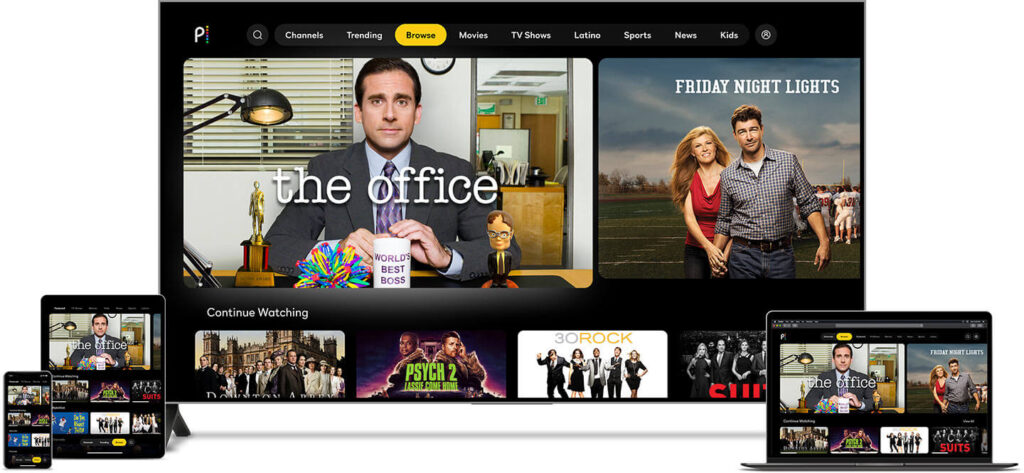
What is Peacock TV and how to watch it in Australia

How to Watch Peacock TV in Australia

To watch Peacock TV in Australia you need two things:

  • A reliable VPN with superb unblocking capability
  • Peacock TV account

The Howtowatch.com.au testing team tested top VPNs for streaming recommended by reputable websites like Comparitech, TechRadar, Tom’s Guide, and PC Mag to find out the best VPN to get and watch Peacock TV in Australia. 

And after extensive testing, we found ExpressVPN, the best among all, followed by NordVPN and Surfshark. (Keep reading for detailed analysis).

Once you sign up for a VPN, it’s time to get a Peacock TV account in Australia.

Sign Up for Peacock TV in Australia

To pay for Peacock TV in Australia, you need a payment method that is linked with US banks and payment services such as US debit/credit card, American PayPal account etc.

If you already have an American payment method, you can skip the following part and directly jump to “how to watch Peacock TV in Australia”.

But if you don’t have any American payment method, you can follow the easy to follow instructions below.

Here you can learn the process to sign up and watch Peacock TV in Australia quickly:

  1. Connect to the US server using a VPN.
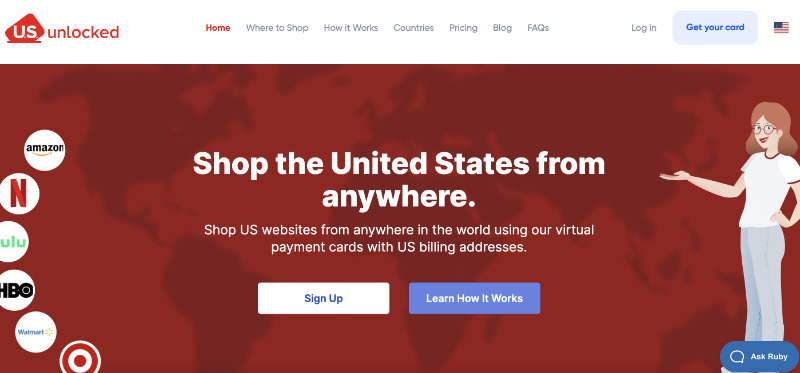
  2. Visit usunlocked.com and tap/click on the “Get your card” button.Click on Get You Card Button
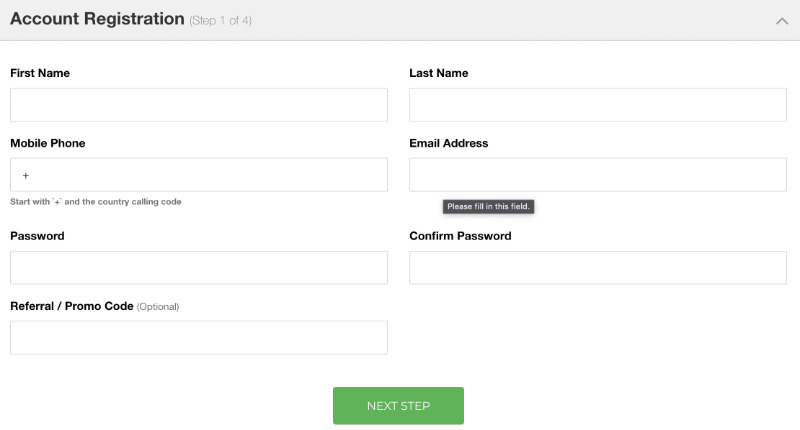
  3. Now enter all the required details and click/tap on the “NEXT STEP” button. Enter all the required details to create US unlock virtual prepaid card
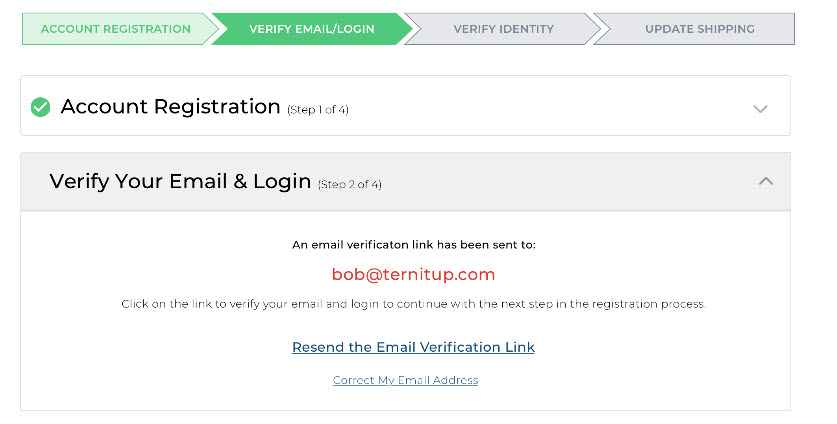
  4. You will get the verification link on the email address. Verify your email address. Verify your email address
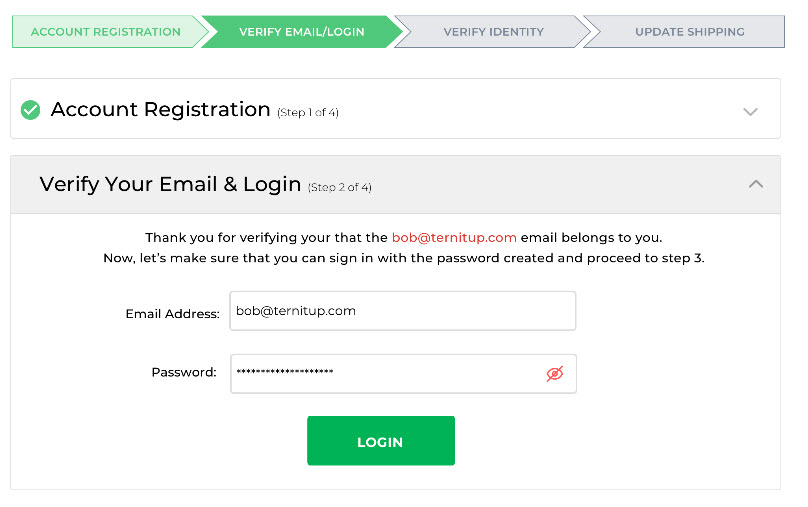
  5. Once the verification is complete, it will ask you to log in to your account. Now log in with your email and password.login with your email and login
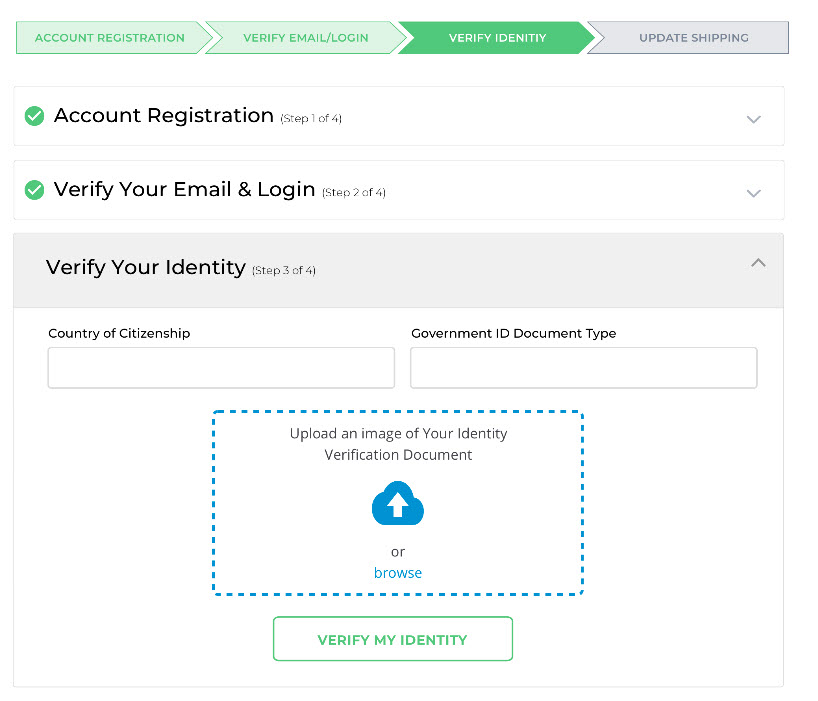
  6. Verify your identity. Fill out your Country, ID Type, and upload an image of your Identity Document, and click/tap the “VERIFY MY IDENTITY” button.Verify your identity
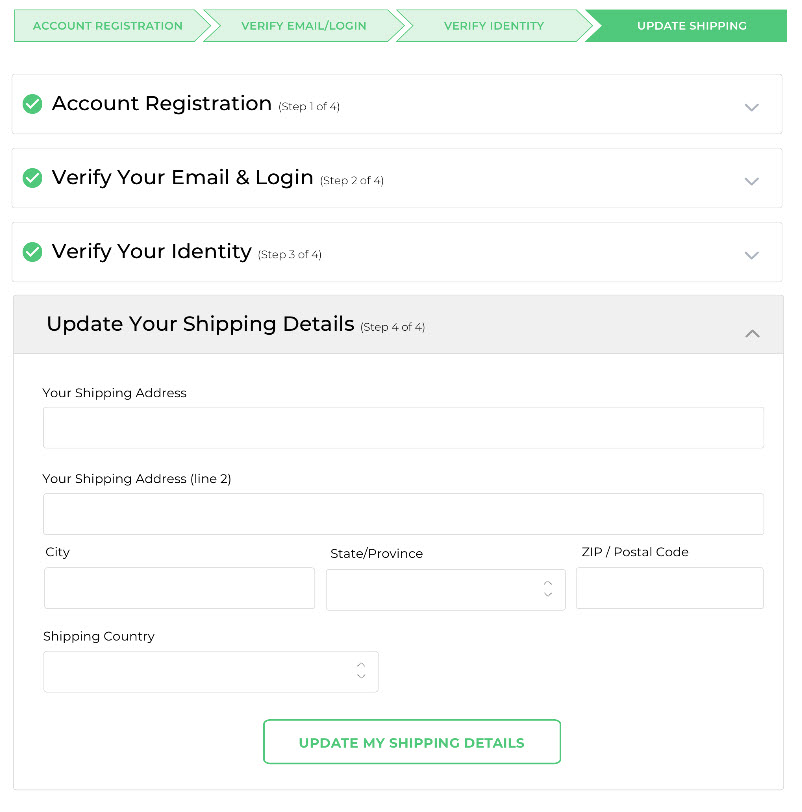
  7. Now enter your shipping address. This must be your home address where you want the card delivery and then tap/click on the “UPDATE MY SHIPPING DETAILS” button.Enter your shipping address
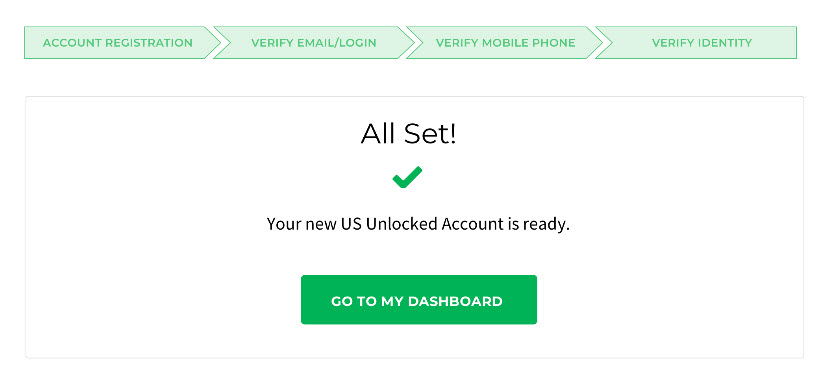
  8. Once the shipping details are updated, a new screen will appear that says, “All Set ✅ your new US Unlocked Account is Ready.” Click/tap on the “GO TO MY DASHBOARD” button.Go to Dashboard
  9. Now load your account using your debit/credit card. You can load any amount between $50 USD to $3500 USD. Add funds in to your us unlocked virtual prepaid card
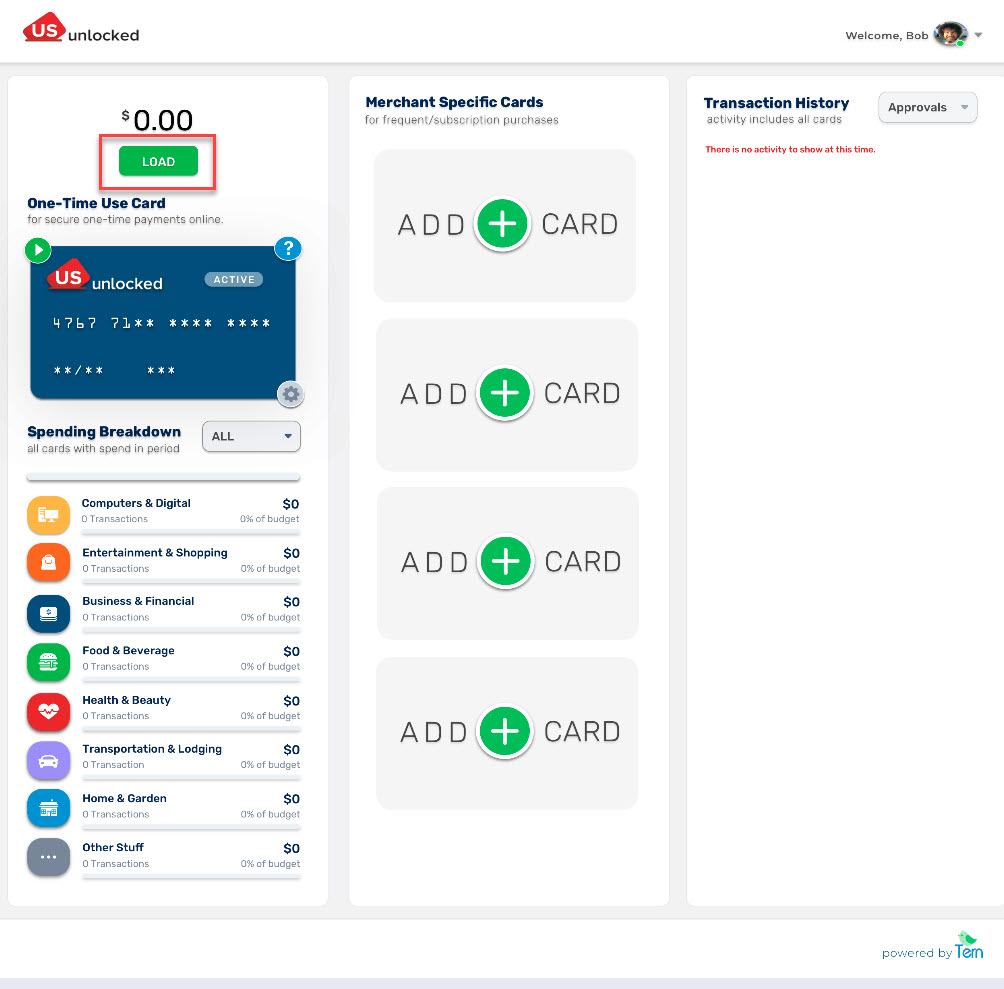
  10. Once you add funds to your US virtual prepaid card it will take 3-5 days max to show the fund.
  11. After the funds are added to your US virtual prepaid card it’s ready to use.
  12. Now visit Peacock TV and click on “PICK A PLAN.”
  13. Choose a plan by clicking on it. 
  14. Now enter all the required details and click on “Create Account”. You can easily find the US Zip Code on Google. enter all the details and click Create Account
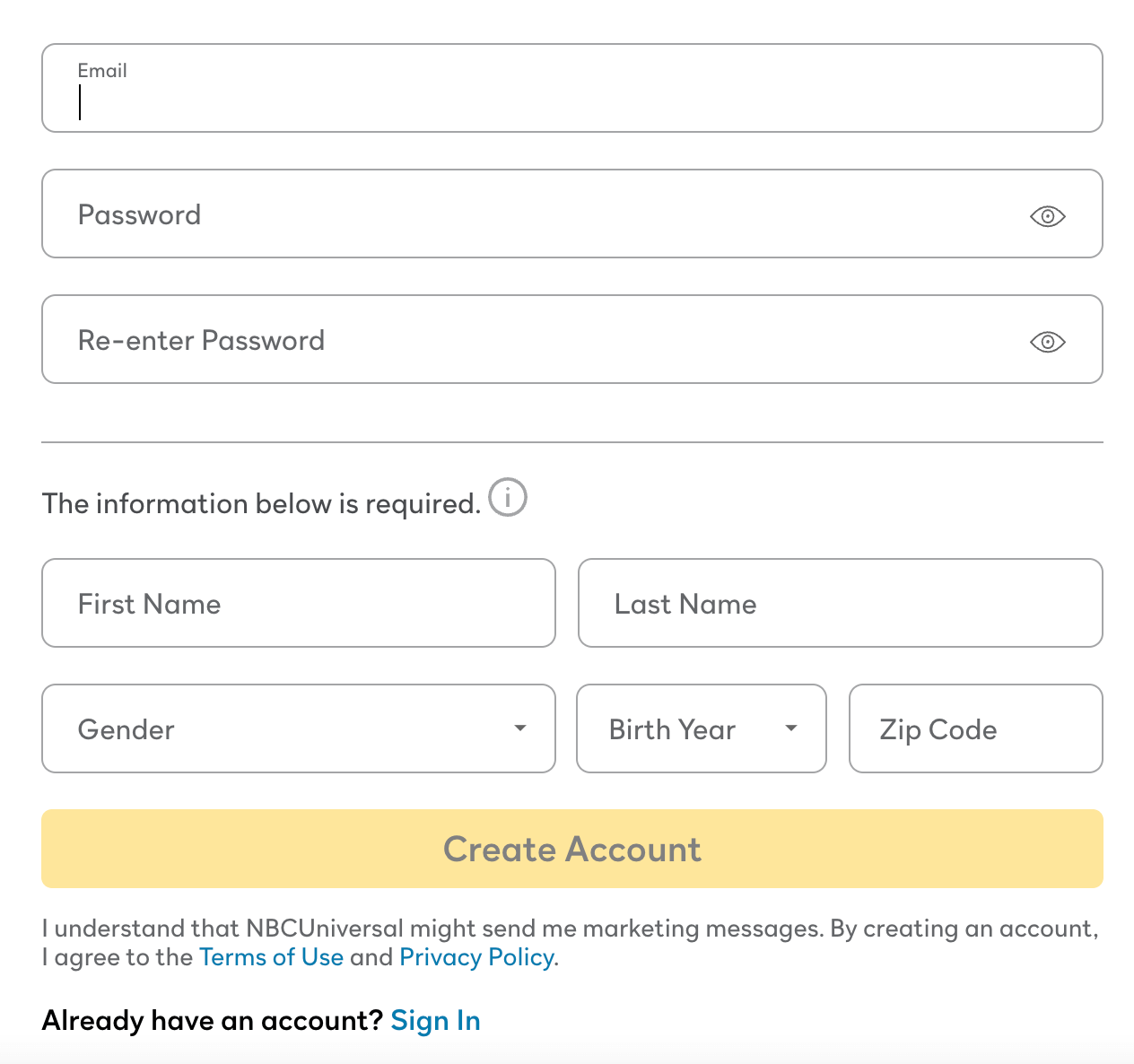
  15. Once the process is done, you will get a verification email. Verify your account by clicking on the link in the verification email.
  16. Now sign in with your email address and password on the Peacock TV website and pay through the US Virtual Prepaid Card you just created.

Once you sign up for Peacock TV, it is effortless to watch your favorite content in Australia.

Now follow these 3 easy steps to watch Peacock TV in Australia:

  1. Connect to the US server using a VPN if you haven’t already.
  2. Now make sure your device location is off.
  3. Visit Peacock TV and start watching in Australia.

That’s how Peacock TV Australia fans can watch all their favorite shows and movies on Peacock TV in Australia.

If you are a Peacock TV Australia enthusiast looking for a way to get a Peacock TV free trial, read this guide. If you are looking to cancel your Peacock TV subscription, read this guide.

Best VPN for Peacock TV in Australia

Here are the best VPNs to watch Peacock TV in Australia:

ExpressVPN is a hyper-successful, workaholic VPN with lightning-fast servers that retain all your internet speed, which is essential if you want to stream Peacock TV in Australia.

This provider’s noteworthy features are:

  • Above 3000 servers in 160 locations (94+ countries)
  • Offers apps and software support for Mac, Windows, Amazon Firestick/Fire TV, Apple TV, Roku, iOS, Android, Smart TV, PlayStation, and Xbox.
  • Proven security and privacy features like 256-AES military-grade encryption, kill switch button, IP, and DNS leak protection.
  • an ability to connect to 5 devices at once
  • Unblocks popular streaming services, including Hulu Australia, American Netflix, HBO Max, YouTube TV, BBC iPlayer, Hotstar, Channel 4, TV Player, ABC, ESPN+ in Australia, and others.
  • 24/7 excellent chat support.
  • 15 months in the first-year plan (3 extra months) with a 30-day money-back guarantee

And the steal? It’s got 30,000 different IP addresses – you will be untraceable.

2. NordVPN (Affordable)

NordVPN is the Apple of VPNs – the largest market in the VPN industry. Nord has been particularly promising in the user-friendly area:

  • UI is easy to use with the ‘Quick Connect‘ button
  • has more than 5000 servers, 62 locations (and 62 countries)
  • has the lowest yearly rates
  • can form six simultaneous connections

The jewel in Nord’s crown is Double VPN – meaning double encryption, double security.

3. SurfShark

Surfshark is a reliable and budget-friendly VPN, perfect for streaming Peacock TV in Canada with strong privacy and speed.

Its best features are:

  • 3,200+ servers in 100 countries (including multiple U.S. locations)
  • Unlimited device connections with a single account
  • Works on all major platforms (Windows, Android, iOS, macOS, Fire TV, more)
  • Built-in Smart DNS for devices that don’t support VPN apps
  • Fast speeds and NoBorders mode to bypass VPN blocks easily
  • Affordable plans with a 30-day money-back guarantee

These three VPNs are my top choices as they’ve stood steadfast to their brand. They’re consistently providing optimum security and have always dealt ethically with user data – unlike free VPNs.

Peacock TV vs. Other Streaming Services in Australia 2025

Peacock TV is still not available as a standalone streaming service in Australia in 2025. NBCUniversal currently distributes its content through local platforms like Hayu, 7Bravo, Foxtel, and others.

Service Price (AUD/mo) Highlights
Peacock Premium (VPN) ~9.33 (ads) Full US library with commercials
Peacock Premium Plus (VPN) ~18.68 (mostly ad-free) Adds downloads & live NBC
Netflix (ads) 6.99 Large global catalogue, 1 stream
Netflix (HD) 16.99 Ad-free, 2 streams, downloads
Netflix (4K) 22.99 4 streams, Ultra HD
Disney+ 15.99 (HD, ads) / 20.99 (4K) Huge family/Marvel/Star content
Max (HBO) 11.99 (ads), 15.99 (HD), 21.99 (4K) HBO originals, blockbusters, Discovery/TLC bundles
Binge 10–22 HBO-style dramas, some sports
Stan 12–21 (+ sports extras) Aussie originals + US content
Prime Video 9.99 Broad library + Amazon perks
Paramount+ ~13 CBS, Star Trek, Yellowstone-style series

Alternatives to Peacock TV in Australia Offering Similar Content

Here’s a comparison of the top alternatives in Australia that offer content similar to Peacock.

AU Service Price/Month (AUD) Peacock-Style Content Notes
Binge $10–22 NBCUniversal series, dramas (e.g. The Office, Chicago Fire, Law & Order), reality TV Licensed via Foxtel, large US back catalogue
7plus / 7Bravo Free (ad-supported) Some Peacock & NBC shows (Below Deck, Real Housewives, Saturday Night Live) Delayed releases, not full library
Hayu $6.99 Reality shows (Below Deck, The Real Housewives, Keeping Up with the Kardashians) Peacock-style reality, but no scripted content
Stan $12–21 Some NBCU shows (Girls5Eva, Younger, The Bold Type) + originals Mix of Australian & US content
Foxtel / Foxtel Now $25+ Full NBCUniversal partnerships, HBO-style dramas, reality TV Expensive but most comprehensive for US content
Paramount+ ~$13 Drama, crime, and reality (CBS, Showtime – some Peacock tonal overlap) Lacks NBC-specific shows
Netflix $6.99–22.99 Peacock-style originals (The Good Place, Brooklyn Nine-Nine, The Fall of the House of Usher) Doesn’t carry true NBC/Peacock exclusives
Amazon Prime Video $9.99 US comedy, crime, drama (The Office US, Psych, Bosch) Strong catalogue of Peacock-like shows

Peacock TV Australia Device Compatibility 2025

Here is the complete list of devices on which Australians can watch Peacock TV:

Web Browsers:

  • Chrome 75+ (Windows/Mac)
  • Firefox 88+ (Windows/Mac)
  • MS Edge 80+ (Windows/Mac)
  • Safari 12+ (Mac)

Mobile and Tablet Devices:

  • Android: 6.0 or above
  • iOS: 14 or above

Connected TVs, Game Consoles and Streaming Devices:

  • Amazon: Peacock is supported on Fire TV and Fire Tablet devices with Fire OS 6 and above.
  • Android TV: Peacock is supported on a wide variety of Android TV-enabled Smart TVs, such as Sony Bravia, and set-top boxes, including NVIDIA Shield, running Android OS 5.1 and above.
  • Apple TV: Apple TV HD (4th Generation or above) with tvOS 13 or above
  • Chromecast: 1st Generation or above, including Chromecast with Google TV
  • Hisense VIDAA: Peacock is supported on Hisense VIDAA powered 2021 devices and newer.
  • LG Smart TV: LG WebOS 3.5 or above
  • PlayStation 4 & 5
  • Roku 2 (4210X model only)
  • Roku 3 & 4 (model 4200X or later)
  • Roku Streaming Stick (model 3600X or later)
  • Roku Express/Express+ (model 3900X or later)
  • Roku Premiere/Premiere+ (model 3920X or later)
  • Roku Ultra/Ultra LT (model 4640X or later) 
  • Roku TV and Smart Soundbar (model 5000X or later)
  • Samsung Smart TV: Peacock is supported on models from 2017 or later. If you’re unsure, you can check your model number and year here.
  • VIZIO Smart TV: SmartCast 2.0 or 3.0 (from 2016 and newer)
  • Xbox One, S, and X

These are the devices where you can Peacock TV on. However, if you want to download Peacock TV on any of these devices in Australia, you need to use a VPN.

How Much Does a Peacock TV Subscription Cost in Australia 2025?

Peacock offers two plans: Premium, and Premium Plus – basically two different price categories. Premium (with ads) costs US $5.99 or AU $9.04 a month, and Premium Plus (no ads) costs US $11.99 or AU $18.11 a month.

From early 2023, Peacock ends both the free plan and free trial for its new subscribers.

The Premium plan offers 80,000+ hours’ worth of content to the library – in fact, the complete Peacock library. Also live sports, events, current NBC and Bravo shows, and 50+ always-on channels with ads.

Peacock’s Premium Plus plan, on the other hand, offers all the content that is available with the premium plan plus live NBC 24/7 channel with limited ads and download shows and movies to watch offline.

Watching Peacock TV in Australia Using a Smart TV 2025

Watching Peacock TV in Australia on a smart TV in 2025 is possible, here’s a step-by-step guide to make it work.

OPTION 1: Use a Smart TV + VPN Router + Peacock App (US Version)

What You’ll Need:

  • A smart TV that supports the Peacock app (Samsung, LG, Android TV, etc.)
  • A VPN that works with streaming (e.g., NordVPN, ExpressVPN, Surfshark)
  • A VPN-compatible router OR a PC with virtual router setup
  • A Peacock account with a U.S. billing method

How to Set It Up:

Step 1: Install a VPN on Your Router

  • Log into your VPN provider’s dashboard and install it on your home router (or use a dedicated VPN router).
  • Set the VPN server location to the United States.

Step 2: Connect Your Smart TV to the VPN Network

Go to your smart TV’s network settings and connect it to the VPN-enabled Wi-Fi.

Step 3: Install the Peacock App

  • On Android TV / Google TV: Search and install Peacock directly (if location spoofed as U.S.).
  • On Samsung/LG: You may need to change the region of your TV to the U.S. in the settings, then install the Peacock app.
  • Alternative: Sideload the app on Android TV using APKMirror or similar trusted sites.

Step 4: Sign In

  • Use your U.S.-registered Peacock account (created using a VPN on a mobile or browser).
  • You should now be able to stream the full US Peacock catalogue.

OPTION 2: Use a Streaming Device (Easier)

  • If you don’t want to tinker with your TV’s settings:
  • Buy a Fire TV Stick, Roku, Chromecast with Google TV, or Apple TV
  • Set up the device using a VPN (via router or smart DNS)
  • Download the Peacock app from the U.S. app store
  • Log in and stream

Many users find this route simpler and less risky than modifying the TV itself.

How to Download the Peacock App in Australia

How to Download the Peacock TV App in Australia on a Laptop/PC (Windows & Mac)?

If you are looking to watch Peacock TV on your laptop or PC (Windows/Mac) in Australia, there is no need to download the app since you can stream it on Peacock’s official website through an internet browser.

Here’s how you can watch Peacock TV in Australia on your Laptop/PC:

  1. Connect to the US server using a VPN.
  2. Make sure your laptop/PC location is off.
  3. Visit Peacock TV website and sign in.
  4. look for the show, movie, or live sports and start streaming Peacock in Australia.

How to Download the Peacock TV App in Australia on iPhone/iPad?

Here’s how you can download the Peacock TV app in Australia on your iPhone/iPad:

  1. First, go to “Settings” on your iPhone/iPad, and click on your profile.
  2. Now tap on “Media & Purchases”, then tap on “View Account”. It will ask for your “Passcode” or “Touch ID” for verification. Enter your “Passcode” or “Touch ID”.
  3. Now tap on “Country/Region” → “Change Country or Region”, then select the United States as your country.
  4. Once you select the United States, the “Terms and Conditions” page will open. Select “Agree” to proceed.
  5. Now enter all the required details. You can easily find US addresses and postal codes on Google – use any one of them.
  6. Now enter “Done” and wait for the process.
  7. Once the process is complete, your App Store region will be changed to the USA. Go to the App Store and download the Peacock app.
  8. After downloading the Peacock app, open the VPN app, connect to the USA server, and start watching!

If you want to know about this topic in more detail, read our “How to Get Peacock TV on iPhone/ iPad in Australia Guide”

How to Download Peacock TV App in Australia on Android Devices?

Here’s how to download the Peacock app in Australia on your Android smartphones, tablets, and TVs:

  1. First, open the VPN app on your Android device and connect to the USA server.
  2. Now open the Play Store app and tap on the 3 bars located on the top left of the screen.
  3. Go to the “Account” section where you will find your name and country.
  4. Now select the USA as your country and enter all the required details.
  5. Once your region changes to the USA, you can download the Peacock TV app and start streaming in Australia.

How to Download Peacock TV App in Australia on Amazon Firestick/Fire TV?

Here’s how to download Peacock TV app on Amazon Firestick/Fire TV in Australia:

  1. Visit the Amazon website and log in to your existing account.
  2. Now click on the “Accounts & Lists” option and then click on “Your Accounts and Content”
  3. Now change your region to the USA from Australia.
  4. Connect your Amazon Firestick device with your TV and then click on “Settings”.
  5. Log out or deregister your account and then sign in back.
  6. Now download the Peacock app and VPN app from App Store.
  7. Open the VPN app and connect to the USA server.
  8. Open the Peacock app and start watching.

How to watch Peacock TV on my Samsung Smart TV in Australia?

Samsung Smart TVs do not support VPN apps directly (like ExpressVPN, NordVPN, etc.) because Tizen OS doesn’t allow native VPN installations. Smart DNS is the easiest for Samsung TVs. If you want full VPN protection and don’t mind the setup, use a VPN-enabled router.

  • Install the Peacock TV app (if not available, sideload it or cast from another device).
  • Set up a VPN on your router (U.S. location).
  • Many VPNs like ExpressVPN, NordVPN, or Surfshark offer Smart DNS.
  • You manually enter the DNS address into your Samsung TV network settings.
  • Works well for unblocking U.S. streaming services.
  • Create a Peacock account using a U.S. payment method or gift card.
  • Connect your TV to the VPN and log into the app.

How to Download Peacock TV App in Australia on Roku, Apple TV, PlayStation, Xbox, and Smart TVs?

Downloading the Peacock app outside the USA on devices like Roku, Apple TV, PlayStation, and Smart TV without Android OS is very technical since these devices do not support the VPN app directly.

Due to this high level of complexity in downloading the Peacock app on these devices, we recommend using devices like Amazon Firestick/Fire TV and casting through your smartphones to watch Peacock in Australia on big screens.

However, if you, as a Peacock TV Australia devotee, still want to download and watch Peacock on these devices, you can directly set up a VPN on your router or use the Smart DNS feature.

Testing Criteria for Choosing The Best VPN to Watch Peacock TV in Australia

In this enormous VPN market competition, there are only a few brands that are reliable and have extraordinary bypassing capabilities. To find the best, we tested 31 VPN services to unblock Peacock TV in Australia on the following criteria:

  • Offers at least 1000 dedicated servers for streaming and has the outstanding unblocking capability to access popular streaming services like Peacock TV, Hulu, HBO Max, BBC iPlayer, YouTube TV, and Amazon Freevee Australia.
  • Provides apps and software support for all common streaming devices including Windows, Mac, Apple TV, Roku, Smart TV, PlayStation, Xbox, Amazon Firestick/Fire TV, Android, and iOS.
  • Offers at least 4 simultaneous per account to watch on different devices at the same time.
  • Excellent customer support and at least a 30-day money-back guarantee.
  • Provides super strong security protocols such as high-grade military-grade encryption, kill-switch, IP, and DNS leak protection to keep user’s online activities anonymous and safe from hackers.

How VPN Unblocks Peacock in Australia

Peacock TV’s algorithm is designed with a geo-blocking feature, that if any device from an internet network outside the US wants to connect, it’s automatically rejected with this heartbreaking message:
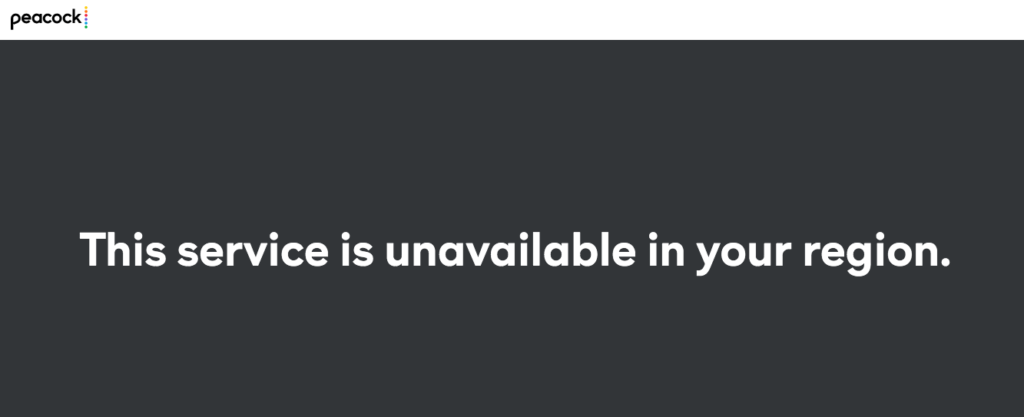
Peacock TV geo-location error while streaming in Australia

So, what is the VPN doing to counter this restriction? Don’t worry. It’s nothing illegal; let me show you how in these pointers:

  1. You click the connect button, and the VPN connects you to its designated server in the location of your choice – the US in this case.
  2. When you do a search after the connection, the VPN tells the landing site that you’re not from Australia but the US – because you’ve connected to a US server.
  3. This communication satisfies Peacock TV’s algorithm, and voila, you’re in.

This was the simplest I could break it down for you – no thanks?

Now that everything is ready, it’s time to understand another important thing: Peacock TV plans. Let’s compare the three briefly.

Peacock TV Australia Content Library 2025

Peacock TV’s 2025 library features over 40 premium shows and movies, including exclusive NBC series, live sports, and blockbuster films. 

Here’s a list I compiled for Peacock TV Australia fanatics for the best movies and shows to go for when they watch Peacock TV in Australia:

  1. Six Nations
  2. Law & Order: Organized Crime (Via NBC)
  3. Law & Order SVU (Via NBC)
  4. Chicago Fire (Via NBC)
  5. Chicago Med (Via NBC)
  6. Chicago PD (Via NBC)
  7. Dr. Death
  8. Sealed with a List
  9. Round and Round
  10. Mr. Monk’s Last Case: A Monk Movie
  11. My Norwegian Holiday
  12. Love Island Games
  13. Five Nights at Freddy’s
  14. John Carpenter’s Suburban Screams
  15. The Continental: From the World of John Wick
  16. Twisted Metal
  17. Shooting Stars
  18. Bupkis
  19. Mrs. Davis
  20. The Traitors
  21. The Best Man: The Final Chapters
  22. Love for The Ages
  23. Baking It
  24. One of Us is Lying
  25. The Calling
  26. The Office
  27. American Psycho
  28. Firestarter
  29. America’s Got Talent
  30. Bourse Trilogy
  31. The Dark Knight
  32. Psycho (Alfred Hitchcock)
  33. Atonement
  34. The Matrix Trilogy
  35. Se7en
  36. Sinister

Ah, the masterpieces. A mix of comedy, action, horror, suspense, and drama. You’ve started to like me, haven’t you?

Troubleshooting Peacock TV Streaming Issues in Australia

Here are the five most common Peacock TV streaming issues in Australia and their proven solutions:

  1. Peacock isn’t available in your region

Cause: Your device or browser is leaking your Australian location.

Fix:

  • Use a VPN that works with Peacock (e.g. NordVPN, ExpressVPN, Surfshark)
  • Connect to a U.S. server before opening Peacock.
  • Clear cookies/cache on your browser or app before logging in.
  • Make sure location services are disabled (especially on mobile).
  1. App won’t install or show in app store

Cause: Your smart TV or app store is set to the Australian region.

Fix:

  • Change device region to United States:
  • On Apple TV: Change iTunes/App Store region.
  • On Android/Google TV: Use a U.S. Google account.
  • On Samsung/LG: Change Smart Hub region (may need factory reset).
  • Use a streaming device like Fire TV Stick or Roku set to the U.S.
  • Sideload the app manually on Android TV (APKMirror, etc.).
  1. “Video Not Available” / Content won’t load

Cause: VPN is blocked or slow, or DNS conflict.

Fix:

  • Try a different U.S. server in your VPN app.
  • Use Smart DNS instead of a full VPN (if your provider offers it).
  • Turn off IPv6 in router settings (to prevent DNS leaks).
  • Restart your router and streaming device.
  1. Buffering or Low Video Quality

Cause: Slow VPN connection or congested server.

Fix:

  • Switch to a different U.S. server in your VPN.
  • Use Ethernet instead of Wi-Fi on smart TVs or set-top boxes.
  • Test your speed: Peacock recommends 5 Mbps (SD), 10 Mbps (HD).
  • Close background apps using bandwidth.
  1. Login Issues or Account Not Accepted

Cause: Peacock account created outside the U.S., or payment method not valid.

Fix:

  • Create account using VPN + U.S. billing method or gift card (from sites like MyGiftCardSupply).
  • Use a browser in incognito mode during signup to avoid cookie conflicts.
  • If already subscribed, contact support: Peacock Help Center.

FAQs

Is Peacock TV available in Australia?

Peacock TV is not available in Australia due to geo-restrictions. However, if you use VPN (ExpressVPN) with US IP you can stream Peacock Australia on Android, iPhone, or any device.

Is Peacock streaming free with Amazon Prime?

No, Peacock is not free with Amazon Prime in Australia. Peacock requires a separate subscription and is only available in the U.S., but you can access it in Australia using a VPN.

Does Peacock TV work in Australia?

No, Peacock TV does not work in Australia directly. However, some Peacock TV shows and movies will be available on Foxtel in Australia.

Is Peacock TV available in Australia through other streaming platforms?

While you can’t subscribe to Peacock directly in Australia, Stan, Foxtel/Binge, and 7Bravo/7plus offer access to much of its content, including originals, movies, comedy, reality, and scripted series via NBCUniversal partnerships.

How to watch Peacock TV on a Chromecast device in Australia?

For the complete Peacock library, including live NBC, you’ll need:

A. Peacock Setup

Sign up for Peacock using a U.S. email and U.S. payment method (credit card or gift card).

B. VPN Configuration

  • Use a VPN that works reliably with Peacock (e.g., ExpressVPN, NordVPN, Surfshark).
  • Connect to a U.S. server on the device you’ll cast from (phone, tablet, or laptop).

C. Install Peacock & Cast

Make sure the VPN is active, log in to Peacock, and tap the Cast icon to stream to your Chromecast.

On Android/iOS: download the Peacock app.

On desktop: use Chrome browser, go to peacocktv.com.

Conclusion

I hope by the time you’re finishing this read, you know what you need to do to watch Peacock TV in Australia.

Peacock TV is an excellent resource. The free version lets you watch almost everything for free – the only cost you’ll have to bear will be for NordVPN. But trust me, this complete package is worth less than the fun you’re going to have watching Peacock! 

How to Get Peacock TV on Apple TV in Australia

Watch Peacock TV on Apple TV in Australia

Do you own an Apple TV but don’t know whether you can access Peacock TV in Australia? The excellent news is Peacock TV is accessible on Apple TV in Australia, as you can easily install its app from the Apple TV store.

NBCUniversal-owned, Peacock TV, houses hundreds of hours of entertainment. You can watch all the popular TV shows, movies, and timeless favorites. There is only one issue though. Peacock TV is geo-restricted and only available for US streaming because of content streaming rights and copyright infringements.

Therefore, you must subscribe to and install a top-tier location-swapping tool named VPN or Virtual Private Network. It will change your region and keep you safe while fooling Peacock TV’s location trackers to access its content catalog. Let’s get into the details!

How to Get Peacock TV on Apple TV in Australia?

It is very effortless to get Peacock on Apple TV and the steps are as follows:

  1. Subscribe and install a top-notch and reliable VPN service like ExpressVPN.
  2. Connect to the US server from the location’s list.
  3. Launch your Apple TV and go to the App Store.
  4. Look for and select the Peacock TV app.
  5. Download the app. Once installed, tap to open.
  6. Next, sign in or sign up for Peacock TV to begin streaming.

Offers 30-day money-back guarantee!

How Much Does Peacock TV Cost in Australia?

Peacock TV has a base plan which is free to use and premium plans. Its free plan offers thousands of hours of entertainment. You can watch classic movies and TV shows and old-time favorites. 

However, if you want more information about the price plan of Peacock TV, check out “How Much Does Peacock TV Cost in Australia?” It is a detailed guide about the different price plans Peacock TV is currently offering.

How to Airplay Peacock TV to Airplay TV?

The Peacock app is available for the 4K and HD editions and Apple TV’s third-generation and earlier models do not have an App Store to install applications. Therefore, screen mirroring and air playing is the best alternative. 

The steps are as follows:

  1. Connect your iPhone/iPad to the same Wi-Fi as your Apple TV.
  2. Activate the reliable and excellent VPN and connect to the US server.
  3. Install the Peacock TV app on your iPhone/iPad.
  4. Sign in or sign up for your Peacock TV account.
  5. Click the Airplay icon on the playback screen.
  6. Select the Apple TV device from the list.
  7. Now, you can stream Peacock TV on your Apple TV. 

Does Peacock TV Offer Free Trial or No?

If you want your answer, you can read our detailed blog “How to Get Peacock TV Free Trial in Australia?” You will find all your answers there in detail. 

Wrapping Up

We hope that you found our guide comprehensive enough to get Peacock TV on your Apple TV in Australia!

Peacock TV is an exciting and fascinating OTT service that is compatible with several mainstream devices like Apple TV. The main issue is that it is only available in the region. However, with a reliable and top-of-the-line VPN, like ExpressVPN, you can stream the entire Peacock TV content catalog without an issue. 

How to Cancel Peacock TV Subscription in Australia

Cancel Peacock TV subscription in Australia

Looking for a way to cancel Peacock TV subscription in Australia?

Peacock TV is a streaming service that offers a wide range of popular TV shows, movies, and original content such as Yellowstone, Downtown Abbey, Bel-Air, Poker Face, John Wick, Harry Potter, and much more. 

Apart from movies and TV shows, you can also watch live sports streaming including Premier League, MLB Sunday Leadoff, Sunday Night Football, Notre Dame Football, NASCAR, NTT IndyCar Series, SuperMotocross World Championship, golf, Olympic sports, and much more.

The service is available in the United States, and it is owned by NBCUniversal, a subsidiary of Comcast. 

However, if you decided to cancel your peacock TV subscription, you can follow the mentioned below steps.

Note: Similar to watching Peacock TV in Australia, you also need to connect with VPN to cancel your subscription.

How to cancel Peacock TV Subscription on Desktop

Follow these steps to cancel your Peacock TV subscription on desktop:

  1. Connect to the US server using a VPN – I used ExpressVPN.
  2. Go to the Peacock TV website and sign in to your account.
  3. Click on your profile icon located in the top-right corner of the screen.
  4. From the dropdown menu, click on “Account”.
  5. Scroll down to the “Subscription” section and click on “Cancel Subscription”.
  6. Follow the on-screen instructions to complete the cancellation process.

How to cancel Peacock TV Subscription on iPhone/iPad

Here’s how to cancel your Peacock TV subscription on iPhone/iPad:

  1. Open the VPN app and connect to the US server. 
  2. Open the “Settings” on your iPhone or iPad.
  3. Tap on your profile at the top of the screen.
  4. Now tap on “Subscriptions”.
  5. Find Peacock TV in the list of active subscriptions and tap on it.
  6. Tap on “Cancel Subscription” at the bottom of the screen.
  7. Follow the on-screen instructions to complete the cancellation process.

How to cancel Peacock TV Subscription on Android 

Follow these steps to cancel your Peacock TV subscription on Android:

  1. Open the VPN app and connect to the US server. 
  2. Open the Google Play Store app on your Android device.
  3. Tap on the menu icon (three horizontal lines) in the top-left corner of the screen.
  4. From the menu, tap on “Subscriptions”.
  5. Find Peacock TV in the list of active subscriptions and tap on it.
  6. Tap on “Cancel Subscription” at the bottom of the screen.
  7. Follow the on-screen instructions to complete the cancellation process.

Offers 30-day money-back guarantee!

How to cancel Peacock TV Subscription if you pay through a 3rd party

If you subscribed to Peacock TV through a third-party service, such as Amazon or Roku, you will need to follow their cancellation process to cancel your subscription. Here are the steps for some popular third-party services:

For Amazon:

  1. Go to the Amazon website and sign in to your account.
  2. Go to “Your Account” and click on “Your Memberships & Subscriptions”.
  3. Find Peacock TV in the list of active subscriptions and click on “Manage Subscription”.
  4. Click on “Cancel Subscription” and follow the on-screen instructions.

For Roku:

  1. Go to the Roku website and sign in to your account.
  2. Click on “Manage your subscriptions” under “My Account” and find Peacock TV in the list of active subscriptions.
  3. Click on “Unsubscribe” and follow the on-screen instructions.

How to cancel Peacock TV subscription on PlayStation

To cancel your Peacock TV subscription on PlayStation, follow these steps:

  • Turn on your PlayStation and log in to your account.
  • Go to the “TV & Video” section and select the Peacock TV app.
  • Press the “Options” button on your controller and select “Information”.
  • Select “Subscription” and then “Cancel Subscription”.
  • Follow the on-screen instructions to complete the cancellation process.

Consider Pausing Your Peacock TV subscription

If you are thinking to pause your Peacock TV subscription, you will have to follow these steps as mentioned below:

  1. Open the App Store on your device.
  2. Go to  “Payment & subscriptions.”
  3. Click on the Peacock subscription you want to pause.
  4. Tap manage and choose the period to pause payments.
  5. Now click “Confirm.”

Reasons to Consider Keeping your Peacock TV 

There are several reasons to consider keeping your membership of Peacock TV:

  • Access to a variety of content: Peacock TV offers a wide range of content, including popular TV shows, movies, live sports, news, and original content. With a Peacock TV subscription, you can access a diverse selection of titles to suit your preferences.
  • Exclusive content: Peacock TV offers exclusive content that you can’t find anywhere else. This includes original shows, movies, and documentaries that are only available on Peacock TV.
  • Ad-supported and ad-free options: Peacock TV offers both ad-supported and ad-free options, so you can pick the plan that works best for you. If you don’t mind ads, you can save money with the ad-supported plan, while the ad-free plan offers uninterrupted viewing.
  • Flexible pricing: Peacock TV offers flexible pricing, with various plans to suit different budgets and needs. You can choose from monthly or annual subscriptions, and there are options for different levels of access and features.
  • Family-friendly options: Peacock TV offers a selection of family-friendly content, including kids’ shows and movies. You can create separate profiles for each member of your family, so everyone can access the content that’s appropriate for their age and interests.

Note: If you want to know how to get a free trial of Peacock TV, read this “Peacock TV Free Trial” guide. Also, if you are looking for a guide to get information about Peacock TV cost, read the “Peacock TV Cost” guide.

How to Get Peacock TV on Amazon Firestick in Australia

Watch Peacock TV on Amazon Firestick in Australia

Are you wondering how to watch Peacock TV on Amazon Firestick in Australia? The procedure is pretty effortless as you only have to install the Peacock App on your Firestick from the Amazon Store. 

But is Peacock TV available in Australia? Unfortunately, no. This streaming platform is solely US-based and geo-restricted due to content streaming rights and copyright issues. Therefore, you can not stream your favorite titles like The Office, Poker Face, Mrs. Davis, etc., directly in Australia. 

Therefore, you must get help from a top-tier VPN or Virtual Private Network. It will mask your Australian region and make you look like you are from the US; thus, helping you fool and circumvent Peacock TV location trackers. If you want to know the details, this guide is for you!

How to Watch Peacock TV on Firestick in Australia?

These are the following steps to access Peacock TV on your Firestick in 2024 in Australia:

  1. Install and subscribe to the premium VPN on your Firestick device; we endorse using ExpressVPN.
  2. Launch your VPN app and connect to the US server.
  3. Tap three little squares located on the main bar’s right and then choose plus sign to add content to your Firestick.
  4. Search and download the Peacock TV app and then open it.
  5. Login or register by entering your credentials.
  6. Tap Activate on Your Phone link to sign in via your PC or smartphone. 
  7. That’s it! Once you log in, select your favorite titles and enjoy streaming. 

Offers 30-day money-back guarantee!

How to Subscribe to Peacock TV in Australia With a VPN?

After activating your VPN, this is what you have to do:

  1. After choosing a plan, you will be prompted to enter a passcode and email address for registration.
  2. Next, accept the Terms of Service and Privacy Statement before tapping Create Account.
  3. You will receive a confirmation email to verify your Peacock TV account.
  4. You’re done; you have successfully subscribed to Peacock TV on your Firestick in Australia! Now let’s discuss where and how to install the Peacock TV app on Firestick in Australia.

From Where and How to Install Peacock TV on Firestick in Australia?

You can download Peacock TV by using voice control or from the Amazon store and here is a step-by-step guide to help you out.

How to Install Peacock TV on Firestick from Amazon Store in Australia?

After activating your ExpressVPN and connecting to the US server, follow these steps:

  1. Look for Firestick’s main menu through Find.
  2. Head over to the Apps and Games and select Peacock TV.
  3. Select Get or Download and wait for the installation process to finish.
  4. Once done, search for the title you want to binge-watch in Australia. 

How to Install Peacock TV on Firestick Via Voice Controls in Australia?

Tap the microphone icon on your Firestick Remote control to use voice control. Once you connect to the US server follow these steps:

  1. Click the button to activate the remote’s voice control features. 
  2. Say Peacock and click the app to download it.
  3. The app will appear on your app list. Launch it to stream its content catalog in Australia.

How to Install Peacock TV on Firestick in Australia?

Installing the Peacock TV app might be challenging while living in Australia so there are a few steps through which you can install Peacock TV in Australia.

  1. Use the Downloader app to sideload applications on Firestick.
  2. Enable applications from unknown sources.
  3. Installing Peacock TV on Firestick.

1. Use the Downloader app to sideload applications on Firestick

The program Downloader will sideload applications for you on Firestick and this is how you are going to do it:

  • Launch your VPN app and connect to the US server.
  • Go to Firestick’s main menu, tap Find, and select Search. (You can also use the magnifying glass icon to search).
  •  Search Downloader and install it on your Firestick. Now, with the app install your Peacock TV.

2. Enable Applications From Unknown Sources

You have to authorize an application from the unverified senders to install Peacock TV on your Firestick. You have to follow these steps: 

  • Select the Settings icon from the Firestick navigation bar to adjust the settings.
  • Select My Fire TV.
  • Visit Settings, tap Advanced, and then Developer.
  • Select Install Apps from Unknown Sources.
  • Ensure that the Downloader is turned on and you have to tap Yes to continue.
  • You can now sideload your applications on your Firestick via the Downloader app in Australia.

3. Installing Peacock TV on Firestick

Follow the steps to install Peacock TV on your Amazon Firestick in Australia:

  • Launch your VPN app; we recommend using ExpressVPN.
  • Connect to the US server.
  • Press the Firestick remote Home button down for a few seconds and choose Apps from the new window.
  • Access Downloader and launch it.
  • After accessing Downloader, complete the setup steps. Ignore all the warnings and tap the URL text field. 
  • Type in firesticktricks.com/peacock and hit Go.
  • Firestick will install the Peacock TV APK.
  • When a window pops up, tap Done. 
  • Next, click Delete on the prompt that will pop up. 
  • Tap Delete one more time to close the window.
  • That’s it! The installation is complete and you now have Peacock TV on your Firestick.

Offers 30-day money-back guarantee!

How to Update Peacock TV on my Firestick in Australia?

Updating Peacock TV is easy on Firestick if you have installed it from its App Store. The steps are as follows:

  • Go to the Settings menu.
  • Navigate to the Apps menu.
  • Tap App Store.
  • Next, enable the automatic update option.

However, if you have sideloaded Peacock TV and want the latest version of it you have to follow these instructions:

  • Hold down the Firestick remote’s home button down for a moment.
  • Tap the menu option to access the apps.
  • Search Downloader to launch it.
  • Enter the URL firesticktricks.com/peacock and tap Go.
  • The Peacock TV APK will download on your Firestick.
  • Click install.
  • Once the installation is complete, choose the completed button.
  • The newest Peacock TV update is now installed on your device.

How to Fix Peacock TV on Firestick if it’s Not Working in Australia?

Sometimes you may face issues when playing Peacock TV on your Firestick. So if you get stuck when accessing Peacock TV, these are the troubleshooting tips:

  • Restart Firestick by going to Settings, My Fire TV, then System, and Restart.
  • Check Downdetector or Twitter feed for updates if the Peacock TV is down.
  • Check and install an updated version of Peacock TV.
  • Only enable IPv4 and disable IPv6 on your wireless router.
  • Switch to a different server if there are delays in audio and video.
  • Check internet connectivity if you can’t play videos seamlessly.
  • Turn off your modem, router, and Firestick. Unplug them for thirty seconds before plugging them back.

Wrapping Up

We made sure that this article includes all the necessary information to help you stream Peacock TV on your Firestick in Australia. Yes, you can install Peacock TV on your Firestick in Australia but ensure to use a top-of-the-line VPN like ExpressVPN.

ExpressVPN is fast, safe, reliable, and helps you mask your true identity. It offers 100% encryption and keeps your private information protected.          

How to Get Peacock TV on Smart TV in Australia

Watch Peacock TV on Smart TV in Australia

Peacock TV is usually included in newer Smart TVs like LG Smart TVs, Sony Smart TVs, and Samsung Smart TVs. but not everybody can access it because of content streaming rights and copyright infringements. If you live in Australia, you will have issues accessing it.  

Do you wish to access Peacock TV on Smart TV in Australia? This is the guide to get to know how you can get Peacock TV in Australia to watch all the classics and trending content like The Calling, 13 Going on 30, Poker Face, Bel-Air, Hell’s Kitchen, Mrs. Davis, Girls5eva, etc. on Smart TV. 

To fool Peacock TV’s content guards you will need a top-tier VPN (Virtual Private Network) service provider. With a VPN, Peacock TV will immediately grant you permission to access its content library on Smart TV. Without further ado, let’s discuss it in detail!

How to Watch Peacock TV on Smart TV in Australia?

You do not have to install additional software to stream Peacock TV on your Smart TV. You only need a top-notch VPN and a web browser. That’s it! 

This is the way to unblock Peacock TV in Australia:

  1. Subscribe and install a premium VPN with US servers; we prefer using ExpressVPN.
  2. Connect to the US server.
  3. Head over to the wifi’s router admin.
  4. Connect it to the VPN network.
  5. Go to the Peacock TV app or visit its website.
  6. Register by entering the necessary credentials and any US postal code or login to your account.
  7. Search for your favorite title and stream!

Peacock TV offers a free plan but if you wish to stream more titles without ads, you will have to pay a few extra bucks. Do you want to know Peacock TV’s pricing plans? Check out “How Much Does Peacock TV Cost in Australia?” 

Offers 30-day money-back guarantee!

Which Smart TVs Do Peacock TV Supports in Australia?

This is the list of Smart TVs on which you can stream Peacock TV in Australia:

  1. LG Smart TV
  2. Vizio Smart TV
  3. Samsung Smart TV
  4. Sony Smart TV
  5. Toshiba Smart TV
  6. Sharp Smart TV
  7. Hisense Smart TV
  8. Philips Smart TV

When accessing Peacock TV, ensure that your VPN is activated. Then, download the Peacock TV app from the App Store, explore its content library, and begin streaming your favorite content.

Which Smart TV Models Do Peacock TV Support?

These include:

  • Android TVs like Sony Bravia and NVIDIA Shield streaming media players – Android 5.1 or later.
  • LG Smart TV – LG WebOS 3.5 or higher.
  • Apple TV – 4th generation or higher with tvOS 13 installed.

How to Watch Peacock TV on my Smart TV Using Chromecast in Australia?

If you want to link up your PC or mobile device to Smart TV via Chromecast to watch Peacock TV in Australia, this is how you are going to do it:

  1. Launch your ExpressVPN and activate it.
  2. Select the title you wish to stream on the Chromecast-enabled device from the Peacock TV app.
  3. Tap the Chromecast icon located on the right corner to begin streaming on your Smart TV. 

How to Watch Peacock TV on my Smart TV Using Apple AirPlay in Australia?

Goodbye to streaming on small screens! Now you can enjoy watching your favorite Peacock TV movies and shows on large screens via Apple AirPlay. This is the way to pair up the devices:

  1. Activate your VPN and launch your Peacock TV app. Register yourself or login.
  2. Link up your Mac and smart TV by picking the AirPlay symbol from the menu bar.
  3. Once the AirPlay is enabled, click Play. You can also make display changes from the menu.  

Offers 30-day money-back guarantee!

What are the Tips to Fix if Peacock TV is Not Working on Smart TV in Australia?

Sometimes you may face issues and Peacock TV may stop working on your Smart TV. So if a problem occurs, these are the possible fixes that you should look into.

  1. Check your internet connection. Your online connectivity should be steady, stable, and fast.
  2. Erase the cache as it can cause interruptions and failures.
  3. Sometimes the server is down so you can return to the Peacock TV app after a while.
  4. Restart your device.
  5. Persisting problems may require you to uninstall and reinstall the app.
  6. Update the Peacock TV app.

Parting Thoughts

So you see it’s pretty effortless to get Peacock TV on your Smart TV. You only have to link up your device with a premium, excellent, and top-class VPN like ExpressVPN to break the barriers and trespass the forbidden Peacock TV land in Australia. Well, with a VPN on your side, it is not forbidden anymore! 

Once you trespass, follow a few simple steps to register yourself if you haven’t and enjoy streaming your favorite shows like The Office, Two and a Half Men, Vanderpump Rules, etc.  

How to Get Peacock TV on Android in Australia?

Watch Peacock TV on Android in Australia

Peacock TV is an NBCUniversal-owned OTT streaming service that is unavailable in Australia due to content streaming rights and copyright issues. However, these geo-restrictions shouldn’t stop you from watching Peacock TV content on your Android device like Love Island, Apollo 13, Yellowstone, The Real Housewives, The Chosen, What Happens Live With Andy Cohen Season 20, etc., in Australia.

So do you want to know how to get Peacock TV on Android in Australia? This guide explains in detail how the Northern neighbors can get access to Peacock TV on an Android device. 

All you need is a top-tier VPN or Virtual Private Network. Since it is a US-based website, you will have to use a VPN to bypass Peacock TV in Australia. Let’s tap into the details!

How to Get Peacock TV on Android in Australia?

This is how you will trespass Peacock TV on your Android smartphones or tablets in Australia.

  1. Subscribe and install the best VPN provider on your Android device – we prefer using ExpressVPN.
  2. Login and connect to the US server.
  3. Launch Google Play Store to add another Google account. 
  4. Tap Account and choose Add Another Account.
  5. Type in your new Google account with US as your region.
  6. Go back to Google Play Store and look for Peacock TV.
  7. Install the Peacock TV app and sign in by entering your Peacock TV credentials to enjoy your favorite Peacock TV content in Australia.

Offers 30-day money-back guarantee!

Why is a VPN Necessary to Get Peacock TV on Android in Australia?

Peacock TV does not have the right to stream its content library outside the US territory. Therefore, Australian residents can not stream this streaming platform directly due to a geo-location error message.

That’s why a top-of-the-line VPN like ExpressVPN is what you need to stream Peacock TV in Australia. It will mask your Australian region, protect your identity and data, and will help you fool Peacock TV’s location trackers. 

What is Peacock TV and what Features Does it Offer?

Peacock TV owned by NBCUniversal is an on-demand streaming service. It offers three subscription tiers, i.e., a Base Plan that is free to use, Peacock Premium, and Peacock Premium Plus. Its premium packages ask you to pay its subscription fee.

With its base plan, you watch numerous all-time favorite classics, movies, and TV shows but the content catalog will be limited. However, with its premium packages, you can stream the latest trending movies, tv shows, sports, etc. 

If we talk about its features, it is an on-demand service so you are not bound to watch Live TV. You can stream its unlimited content library that includes originals, classics, hit movies, kids’ shows, etc. 

Moreover, Peacock TV app has an attractive and easy-to-use interface. It is operable, manageable, and comprehensible. It displays its content in rows for better viewing and its algorithm shows you your preferred genres or the ones you watch the most.

How to Fix Peacock TV if it’s Not Working on Android in Australia?

These are the following hacks you should try if Peacock TV is not working on your Android device.

  1. Restart your Android smartphone or tablet or your Peacock TV app.
  2. Clear cache and cookies.
  3. Uninstall and reinstall the Peacock TV app.
  4. Check internet connectivity. 

Does Peacock TV Offer a Free Trial in Australia?

No. Peacock TV has discontinued the free trial. However, it offers a Base Plan through which you can stream its content catalog for free. For more information, you can check out this guide, “How to Get Peacock TV Free Trial in Australia?” 

What to Watch on Peacock TV on Your Android Device in Australia?

You can watch the following:

Peacock TV Originals

  • Brave New World
  • Bel Air
  • Days of Our Lives: A Very Salem Christmas
  • Anthony
  • Days of Our Lives: Beyond Salem

Peacock TV Movies

  • Bridesmaids
  • Happy Gilmore
  • The Godfather Trilogy
  • Trainwreck
  • Billy Madison

Peacock TV Shows

  • One of Us Is Lying
  • The Calling
  • Baking It
  • The Capture
  • Pitch Perfect: Bumper in Berlin

Wrapping Up

Was this guide easy and informative? This was all about how to get Peacock TV on Android in Australia. We believe that we covered everything to help you access Peacock TV on your Android device in Australia. 

Just make sure that you are using an excellent, premium, and outstanding VPN like ExpressVPN. It will keep you 100% encrypted and protected from cybercriminals.                    

How to Get Peacock TV on iPhone/ iPad in Australia

Watch Peacock TV on Iphone_ Ipad in Australia

Do you own an iOS device? Most Peacock TV users use an iPhone or iPad to watch its expanding content library. So if you want to watch Peacock TV on your iPhone or iPad in Australia, this guide is for you!

Peacock TV is an American streaming platform unavailable in other regions due to content streaming rights and copyright infringements. Therefore, to get Peacock TV on iPhone or iPad will require you to subscribe to a VPN or Virtual Private Network.

The thing is that a regular VPN will not work. You must subscribe to a premium and reliable VPN with US servers like ExpressVPN. With a top-notch VPN, you can stream all the latest and all-time favorite Peacock TV shows and movies in Australia. 

So now let’s get into the details!

How to Get Peacock TV on iPhone/iPad in Australia with a VPN?

With a reliable VPN like ExpressVPN, you can open Peacock TV in Australia. This is how you are going to do it.

  1. Go to ExpressVPN’s website and subscribe to one of its plans. 
  2. Install the VPN app on your iPhone or iPad and select the US server.
  3. Tap the “Connect” button and visit Peacock TV to log in or sign up.
  4. Scroll through its content catalog and choose the content you wish to stream in Australia.

Offers 30-day money-back guarantee!

How Do I Install Peacock TV on my iPhone or iPad?

Follow the steps to install Peacock TV on your iOS device.

  1. Subscribe and install the excellent VPN service that has high-speed servers like ExpressVPN.
  2. Now, connect to the US server.
  3. Change your Apple ID region by tapping on Media and Purchases. Then, View Account and Change Country/ Region.
  4. Click to open the Apple App Store and search for the Peacock TV app.
  5. Install the Peacock TV app.
  6. Sign in or sign up to enjoy Peacock TV on your iOS in Australia.

Offers 30-day money-back guarantee!

Which iPhone or iPad version will you need to watch Peacock TV in Australia?

Peacock TV supports iOS 12 or the latest version. Currently, iOS 15 is the latest version, and if you do not have the latest iOS version, you can head over to software updates to upgrade the version.

What Features Does Peacock TV Offer on iPhone or iPad in Australia?

The features include:

  1. Peacock TV’s Premium Plus Plan offers offline download and streaming on your iPhone or iPad in Australia.
  2. Peacock Premium Plan and its Base Plan have a strict policy to showcase ads that are approximately five minutes long per hour of content.
  3. You can use up to three devices to stream Peacock TV’s content in Australia.
  4. Premium and Basic Plan offers parental control on your iOS device; thus, you can narrow down the content for your kids.

What is the Cost of Peacock TV to Stream on iPhone or iPad in Australia?

The list of prices is as follows to subscribe to Peacock TV on your iOS device in Australia.

Plan Cost Features 
Base PlanFree With ads and limited streaming options.
Peacock Premium AU$7.46With ads and unlimited titles.
Peacock Premium PlusAU$14.94No ads and unlimited content.

How to Fix if Peacock TV is Not Working on the iPhone or iPad in Australia?

Here are some troubleshooting tips to resolve the issue in Australia.

  1. Ensure that your internet connection is stable.
  2. Check if your app storage is full or not and then clear the cache and cookies. 
  3. If you face app glitches, uninstall and reinstall the Peacock app.
  4. In situations of temporary glitches, restart your iPad or iPhone. 

Can I Airplay or Cast Peacock TV from my iPhone or iPad in Australia?

Yes, it is possible by selecting the Airplay icon from the Menu bar. However, ensure that your other device is compatible with this function to help you enjoy and stream Peacock TV in Australia.

Conclusion

Streaming Peacock TV on your iPhone or iPad requires a bit of homework; therefore, this guide is here to help you through. It is brief, to the point, and contains all the steps, tips, and tricks to help you get Peacock TV on iPhone/iPad in Australia. 

The guide includes the installation procedure of Peacock TV, its features, subscription cost, and some troubleshooting tips. We hope that this guide answers all your queries. However, ensure to use a top-of-the-line VPN service ExpressVPN to trespass Peacock TV in Australia without an issue.   

How to Get Peacock TV Free Trial in Australia?

Cancel Peacock TV Subscription in Australia

Peacock TV houses several incredible shows and movies like Mrs. Davis, The Office, Bruce Almighty, Unexpected Grace, etc. Do you want to watch the latest or your favorite old shows with Peacock TV’s free trial in Australia?

This question might be wandering in your mind about how to get a Peacock TV free trial in Australia but the short and sweet answer is that Peacock TV currently is not offering any free trial. Its premium packages that were offering a 7-day free trial were also discontinued in 2021. 

However, the Basic Peacock service is available with no cost or trial time. You only have to enter your email address to create an account to begin streaming. 

Since you know the outline, let’s get into the details regarding Peacock TV’s free trial and how to get it in Australia!

How to Get Peacock TV Free Trial in Australia?

Peacock TV’s premium packages used to provide a 7-day free trial but now it has been withdrawn. Now, you can only sign up for Peacock TV’s free plan which is ad-supported and has limited movies and TV shows. 

With Peacock TV’s free trial, people used to enjoy live sports, EPL, golf, Sunday Night Football, and plenty of other content. But since it is unavailable, you can use its base plan. 

However, you will have to use a VPN to watch Peacock TV outside the US. To stream Peacock TV in Australia, you will have to use a top-notch and premium VPN service provider, i.e., ExpressVPN. This is how you can get Peacock TV with ExpressVPN.

  1. Subscribe and install ExpressVPN.
  2. Fire the VPN app, log in by entering credentials, and connect to the US server.
  3. Head over to Peacock TV and log in or sign up.

Offers 30-day money-back guarantee!

Peacock TV Free Trial Subscription Plans

Peacock TV is currently offering three plans – Base Plan, Peacock Premium, and Peacock Premium Plus. Its base plan is entirely free; however, Peacock Premium and Peacock Premium Plus used to offer a 7-day free trial which they have discontinued. 

Peacock TV’s free trial was to be used on any device with ease. Customers enjoyed using its free trial on Smart TVs, mobile devices, gaming consoles, etc. 

Does Peacock Premium Offer a Free Trial in Australia?

No, it doesn’t because it got discontinued in 2021. However, you can purchase this plan as it costs 7.45 AUD and it offers a better content library than its base plan. You can watch trendy movies and TV shows and the latest released episodes.

What about the ads? Good question; like the base plan, this subscription plan also supports ads.

Does Peacock Premium Plus Offer a Free Trial in Australia?

Like Peacock Premium, this subscription plan does not offer a free trial either. This plan costs around 14.91 AUD but it will give you full access to Peacock TV’s content library without the commercials. Moreover, Premium Plus subscribers can watch titles offline and can download too. 

Ending Note

Although currently not offering a free trial, having a limited but free content catalog with the latest titles to stream has made this streaming platform exceptional in a virtual entertainment space. You can stream its exclusive content library by paying for its premium plans. 

It doesn’t offer a seven-day free trial anymore, but you can use its free plan or pay for its premium subscription plan to get access to its latest and trendy titles available. 

Moreover, since Peacock TV is solely US-based, Australian residents have to trespass Peacock TV via a VPN – an exceptional one, i.e., ExpressVPN. That was all about the Peacock TV free trial in Australia. We hope that you find it useful and informative.    

Note: If you want to know how to cancel Peacock TV subscription, read this “Peacock TV Subscription Cancellation” guide. Also, if you are looking for a guide to get the information about Peacock TV cost, read the “Peacock TV Cost” guide.

How Much Does Peacock TV Cost in Australia?

Peacock TV cost in Australia

Peacock TV – a streaming service from NBCUniversal, is an excellent streaming service with timeless classics, true-crime, reality TV shows, comedy, drama, and culture-defining entertainment. This video-on-demand streaming service was introduced in the mid-2020s, and it was well-recognized because of the all-time hit sitcom “The Office.”

Although geo-blocked and you need a VPN to stream it in Australia, do you want to know the cost to stream its industry-produced and original content catalog in Australia?

Peacock TV is a hub of 80,000+ hours of entertainment, and you can stream it by choosing any one of its subscription plans. Scroll below to learn the different subscription plans Peacock TV is offering!

How Much Does Peacock TV Cost in Australia?

As of January 2025, Peacock TV offers two subscription tiers:

  • Peacock Premium: $7.99 USD per month (~$12.50 AUD)
  • Peacock Premium Plus: $13.99 USD per month (~$22 AUD)

Peacock TV’s Different Pricing Plans

Peacock TV offers different plans, each of which is slightly different from one another. Among the different subscription plans of Peacock TV, it offers an ad-supported version that requires a sign-up. It has a limited content library, but you can watch it for free. 

Don’t need advertisements? You can pay a small subscription fee to watch its impressive content library without ads. Let’s get into the depth of the different packages Peacock TV is offering:

Peacock Premium

It has more options than the free package and offers a massive library of about 60,000+ hours of entertainment and 50+ channels to stream; its enormous content catalog is bound to end your boredom! However, the only con of this package is that it supports ads. 

This tier containing ads costs about US$5.99/month (9.04 AUD) and US$59.99/year (91.50 AUD). Besides that, with this package, you can watch WWE and free live sports in Australia.   

Peacock Premium Plus

This tier has an even more massive catalog than Peacock Premium but without the ads. You will have access to Peacock TV’s entire content library. The ad-free package costs about US$11.99/month (18.11 AUD) or US$119.99/year (183.02 AUD). This version provides offline viewing, and you can download the content to watch it later. 

Do you want to know the difference between these three Peacock TV tiers in a more summarized way? You can check out this table!

Peacock TV Premium vs. Premium Plus 

Peacock TV PremiumPeacock TV Premium Plus
Contain adsNo ads
Have access to almost all of its content libraryFull access of Peacock TV’s content catalog
No offline viewing and downloading optionAllows the downloading of specific titles

How to Pay for Peacock TV in Australia?

Although you live outside the US, you can choose multiple options to pay for the Peacock TV subscription. These include:

Paypal Account

You must link your credit/debit card or bank account to the Paypal account.

Cards 

These are the various cards accepted by Peacock TV:

  • American Express
  • Discover
  • VisaMasterCard
  • Credit Card

iTunes

You must create and connect a new Apple ID to the bank account.

Online Gift Cards

  • Giftcardcabin.com
  • iTunes gift card
  • Amazon.com

Ending Note

Although NBC has expansion plans and is planning to make Peacock TV available in Australia, it still needs to be decided. But the good thing is a VPN is available, and several different payment options are available to pay for a Peacock TV subscription and stream its entertaining content catalog.